At Ebí, family comes first.
Shop NowShop the Smart Way
Electronics
Magic Keyboard is available with Touch ID, providing fast, easy, and secure authentication for logins and purchases.
Magic Keyboard with Touch ID and Numeric Keypad delivers a remarkably comfortable and precise typing experience. It features an extended layout, with document navigation controls for quick scrolling and full-size arrow keys, which are great for gaming. The numeric keypad is also ideal for spreadsheets and finance applications. It’s wireless and features a rechargeable battery that will power your keyboard for about a month or more between charges.¹ It pairs automatically with your Mac, so you can get to work right away.
It features a USB-C port and includes a woven USB-C Charge Cable that lets you pair and charge by connecting to a USB-C port on your Mac, so you can charge all of your favorite devices with just a single cable.
Symphonic boom.
AirPods Max, the ultimate listening experience. Now in five new colours. An Apple-designed driver provides high-fidelity audio. Every detail, from canopy to cushions, has been designed for an exceptional fit. Pro-level Active Noise Cancellation1 blocks outside noise, while Transparency mode keeps you connected to your environment. Updated with a USB-C connector for even more convenient charging.
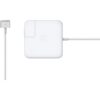
The 85W MagSafe 2 Power Adapter features a magnetic DC connector so if someone trips over it, the lead disconnects harmlessly and your MacBook Pro stays put safely. It also helps prevent fraying or weakening of the cables over time. In addition, the magnetic DC helps guide the plug into the system for a quick and secure connection.
When the connection is secure, an LED located at the head of the DC connector lights up; an amber light lets you know that your notebook is charging, while a green light tells you that you have full charge. An AC lead is provided with the adapter for maximum lead length, while the AC wall adapter (also provided) gives you an even easier and more compact way to travel.
Designed to be the perfect travelling companion, the adapter has a clever design that allows the DC cable to be wound neatly around itself for easy cable storage.
This power adapter recharges the lithium polymer battery while the system is off, on or in sleep mode. It also powers the system if you choose to operate without a battery.
Compatible with 15- or 17-inch MacBook Pro.
Not sure if this is the right power adapter for your Mac?
See this article for more details about choosing the right one.
Knowing which specific Mac model you have is important. If you are running OS X Lion (10.7) or later, go to the “” menu at the top left of your screen, choose “About this Mac” then click the “More Info...” button. Your Mac model and generation will be displayed.
If you are running an earlier version of OS X, you can enter your serial number here to find out which model you have.
So vibrant. So brilliant.
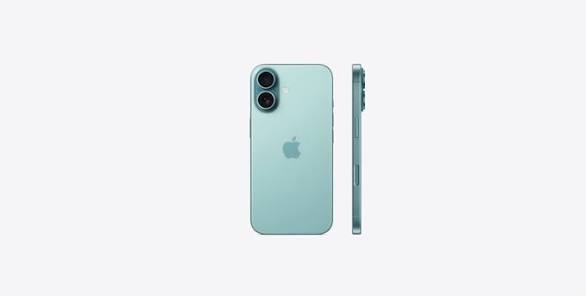
The iPhone 16 Plus 128GB in Black features a 6.7-inch Super Retina XDR display, the Apple A18 chip, and advanced camera controls.
Take Total Camera Control — Camera Control gives you an easier way to quickly access camera tools, like zoom or depth of field, so you can take the perfect shot in record time.
Get Further And Closer — The improved Ultra Wide camera with autofocus lets you take incredibly detailed macro photos and videos. Use the 48MP Fusion camera for stunning high-resolution images, or zoom in with the 2x optical-quality Telephoto.
Photographic Styles — The latest-generation Photographic Styles give you greater creative flexibility, so you can make every photo even more you. And you can reverse any of those styles anytime you want.
Supersmart A18 Chip — A18 jumps two generations ahead of the A16 Bionic chip in iPhone 15. It powers advanced photo and video features, and console-level gaming, with exceptional power efficiency.
Longer Battery Life — iPhone 16 Plus works together with the A18 chip to deliver a big boost in battery life with up to 27 hours video playback. Charge via USB-C or snap on a MagSafe charger for faster wireless charging.
Designed To Last — iPhone 16 Plus has a sturdy, aerospace-grade aluminium design with a 6.7-inch Super Retina XDR display. It’s remarkably durable with the latest-generation Ceramic Shield front that’s 2x tougher than any smartphone glass.
Meet The Action Button—A fast track to your favorite feature. Just press and hold to launch the action you want—the flashlight, a voice memo, Silent mode, and more.
Customise Your iPhone — With iOS 18, you can tint your Home Screen icons with any colour. Find your favourite shots faster in the redesigned Photos app. And add playful, animated effects to any word, phrase or emoji in iMessage.
Vital Safety Features— With Crash Detection, iPhone can detect a serious car crash and call for help if you can't.
The 85W MagSafe 2 Power Adapter features a magnetic DC connector so if someone trips over it, the lead disconnects harmlessly and your MacBook Pro stays put safely. It also helps prevent fraying or weakening of the cables over time. In addition, the magnetic DC helps guide the plug into the system for a quick and secure connection.
When the connection is secure, an LED located at the head of the DC connector lights up; an amber light lets you know that your notebook is charging, while a green light tells you that you have full charge. An AC lead is provided with the adapter for maximum lead length, while the AC wall adapter (also provided) gives you an even easier and more compact way to travel.
Designed to be the perfect travelling companion, the adapter has a clever design that allows the DC cable to be wound neatly around itself for easy cable storage.
This power adapter recharges the lithium polymer battery while the system is off, on or in sleep mode. It also powers the system if you choose to operate without a battery.
Compatible with 15- or 17-inch MacBook Pro.
Not sure if this is the right power adapter for your Mac?
See this article for more details about choosing the right one.
Knowing which specific Mac model you have is important. If you are running OS X Lion (10.7) or later, go to the “” menu at the top left of your screen, choose “About this Mac” then click the “More Info...” button. Your Mac model and generation will be displayed.
If you are running an earlier version of OS X, you can enter your serial number here to find out which model you have.
Opportunity Deals
Amazing deals made just for you
Customer Service
Round the clock customer service
On time Delivery
No delays in our delivery service
Secure payment methods
Your payment options are protected