At Ebí, family comes first.
Shop Now
Filter
Showing 361–380 of 380 results
Sort:
Show:
At Ebí, family comes first.
Shop NowShowing 361–380 of 380 results
Magic Keyboard.
An amazing typing experience for iPad.
The Magic Keyboard provides a comfortable, responsive typing experience. It features a trackpad that opens up new ways to work, smooth angle adjustment, backlit keys, and front and back protection.
Compatibility iPad Pro 13-inch (M4)
Magic Keyboard is available with Touch ID, providing fast, easy, and secure authentication for logins and purchases.
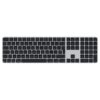
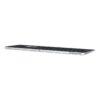
Magic Keyboard with Touch ID and Numeric Keypad delivers a remarkably comfortable and precise typing experience. It features an extended layout, with document navigation controls for quick scrolling and full-size arrow keys, which are great for gaming. The numeric keypad is also ideal for spreadsheets and finance applications. It’s wireless and features a rechargeable battery that will power your keyboard for about a month or more between charges.¹ It pairs automatically with your Mac, so you can get to work right away.
It features a USB-C port and includes a woven USB-C Charge Cable that lets you pair and charge by connecting to a USB-C port on your Mac, so you can charge all of your favorite devices with just a single cable.
Magic Mouse is wireless and rechargeable, with an optimized foot design that lets it glide smoothly across your desk. The Multi-Touch surface allows you to perform simple gestures such as swiping between web pages and scrolling through documents.
The rechargeable battery will power your Magic Mouse for about a month or more between charges. It’s ready to go right out of the box and pairs automatically with your Mac.
It features a USB-C port and includes a woven USB-C Charge Cable that lets you pair and charge by connecting to a USB-C port on your Mac, so you can charge all of your favorite devices with just a single cable.
Magic Mouse is wireless and rechargeable, with an optimized foot design that lets it glide smoothly across your desk. The Multi-Touch surface allows you to perform simple gestures such as swiping between web pages and scrolling through documents.
The rechargeable battery will power your Magic Mouse for about a month or more between charges. It’s ready to go right out of the box and pairs automatically with your Mac.
It features a USB-C port and includes a woven USB-C Charge Cable that lets you pair and charge by connecting to a USB-C port on your Mac, so you can charge all of your favorite devices with just a single cable.
Magic Trackpad is wireless and rechargeable, and it includes the full range of Multi-Touch gestures and Force Touch technology. Sensors underneath the trackpad surface detect subtle differences in the amount of pressure you apply, bringing more functionality to your fingertips and enabling a deeper connection to your content. It features a large edge-to-edge glass surface area, making scrolling and swiping through your favourite content more productive and comfortable than ever.
Magic Trackpad pairs automatically with your Mac, so you can get to work straightaway. The rechargeable battery will power it for about a month or more between charges.
It features a USB-C port and includes a woven USB-C Charge Cable that lets you pair and charge by connecting to a USB-C port on your Mac, so you can charge all of your favourite devices with just a single cable.
Magic Trackpad is wireless and rechargeable, and it includes the full range of Multi-Touch gestures and Force Touch technology. Sensors underneath the trackpad surface detect subtle differences in the amount of pressure you apply, bringing more functionality to your fingertips and enabling a deeper connection to your content. It features a large edge-to-edge glass surface area, making scrolling and swiping through your favourite content more productive and comfortable than ever.
Magic Trackpad pairs automatically with your Mac, so you can get to work straightaway. The rechargeable battery will power it for about a month or more between charges.
It features a USB-C port and includes a woven USB-C Charge Cable that lets you pair and charge by connecting to a USB-C port on your Mac, so you can charge all of your favourite devices with just a single cable.
Magic Trackpad is wireless and rechargeable, and it includes the full range of Multi-Touch gestures and Force Touch technology. Sensors underneath the trackpad surface detect subtle differences in the amount of pressure you apply, bringing more functionality to your fingertips and enabling a deeper connection to your content. It features a large edge-to-edge glass surface area, making scrolling and swiping through your favourite content more productive and comfortable than ever.
Magic Trackpad pairs automatically with your Mac, so you can get to work straightaway. The rechargeable battery will power it for about a month or more between charges.
It features a USB-C port and includes a woven USB-C Charge Cable that lets you pair and charge by connecting to a USB-C port on your Mac, so you can charge all of your favourite devices with just a single cable.
Featuring a black braided design that coils without tangling, this 1-meter cable supports Thunderbolt 5 data transfer up to 120Gb/s;¹ Thunderbolt 3, Thunderbolt 4, and USB 4 data transfer up to 80Gb/s; USB 3 data transfer up to 10Gb/s; DisplayPort 2.1 video output; and charging up to 240W.
Use this cable to connect a Mac with Thunderbolt 3, 4, or 5 (USB-C) ports to Thunderbolt (USB-C) and USB displays and devices such as Studio Display, Pro Display XDR, docks, and external drives. You can also use this cable to connect iPhone and iPad models with USB-C to your Mac
The USB-C Digital AV Multiport Adapter lets you connect your USB-C–enabled Mac, iPad, or iPhone to an HDMI display, while also connecting a standard USB device and a USB-C charging cable.
This adapter allows you to mirror your USB-C–enabled Mac, iPad, or iPhone to your HDMI-enabled TV or display.
iPhone 17, iPhone 17 Pro, iPhone 17 Pro Max, iPhone 16, iPhone 16 Plus, iPhone 16 Pro, iPhone 16 Pro Max, iPhone 15, iPhone 15 Plus, iPhone 15 Pro, iPhone 15 Pro Max, iPad Pro 13‑inch (M5), iPad Pro 11‑inch (M5), iPad Pro 13‑inch (M4), iPad Pro 11‑inch (M4), iPad Air 13‑inch (M3), iPad Air 11‑inch (M3), iPad Air 13‑inch (M2), iPad Air 11‑inch (M2), iPad Air (5th generation), iPad Pro 11‑inch (4th generation), iPad Pro 12.9‑inch (3rd generation and later), MacBook Pro (16‑inch, 2019), MacBook Pro (15‑inch, 2017 and later), MacBook Pro (13‑inch, four Thunderbolt 3 ports, 2020), MacBook Air (2020), iMac (Retina 5K, 27‑inch, 2017 and later), iMac (Retina 4K, 21.5‑inch, 2017 and later), and iMac Pro (2017 and later).
iPad Air (4th generation), MacBook Air (2018 and later), MacBook Pro (13-inch, 2016 and later), MacBook Pro (15-inch, 2016), iMac (non-Retina, 21.5‑inch, 2017), and Mac mini (2018)
Simply connect the adapter to a USB-C or Thunderbolt 3 (USB-C) connector on your Mac, iPad, or iPhone and then to your TV or projector via an HDMI cable (sold separately).
Use the standard USB port to connect devices such as your flash drive or camera or a USB cable for syncing and charging your iOS devices. You can also connect a charging cable to the USB-C port to charge your Mac, iPad, or iPhone.
Connect your device with Lightning connector to your USB-C or Thunderbolt 3 (USB-C) enabled device for syncing and charging, or to your USB-C enabled iPad for charging.
You can also use this cable with your Apple 18W, 20W, 29W, 30W, 61W, 87W or 96W USB‑C Power Adapter to charge your iOS device and even take advantage of the fast-charging feature on select iPhone and iPad models.
Are you here for the Ebí games challenge? Tap start and I'll take you straight to the live competition page.